Comic Books - CBZ, CBR Reader
- 4.0
- Rating
- 50.00K
- Installs
- Free
- Price

 Analysis by App-foxy
I spent time with Comic Books - CBZ, CBR Reader as a straightforward way to read digital comics, and its main appeal became clear quickly: it puts your collection into a bookshelf-style view and lets you read comics offline. That sounds simple, but it changes the experience when your files are already organized on your device and you want to open an issue without depending on a connection. Planner Apps has kept the focus on reading rather than turning the app into a crowded social platform or a general-purpose media library.
This is a free comics app for Android, aimed at Teen users, and it runs on devices with Android 7.0 or later. The current version is 6.35.18.01. I see it as a practical reader for people who already have digital comic files and want a cleaner way to browse them, rather than as a service that supplies a catalog of comics by itself. That distinction matters: the value here is in handling your own reading library.
Why the bookshelf view matters more than it sounds
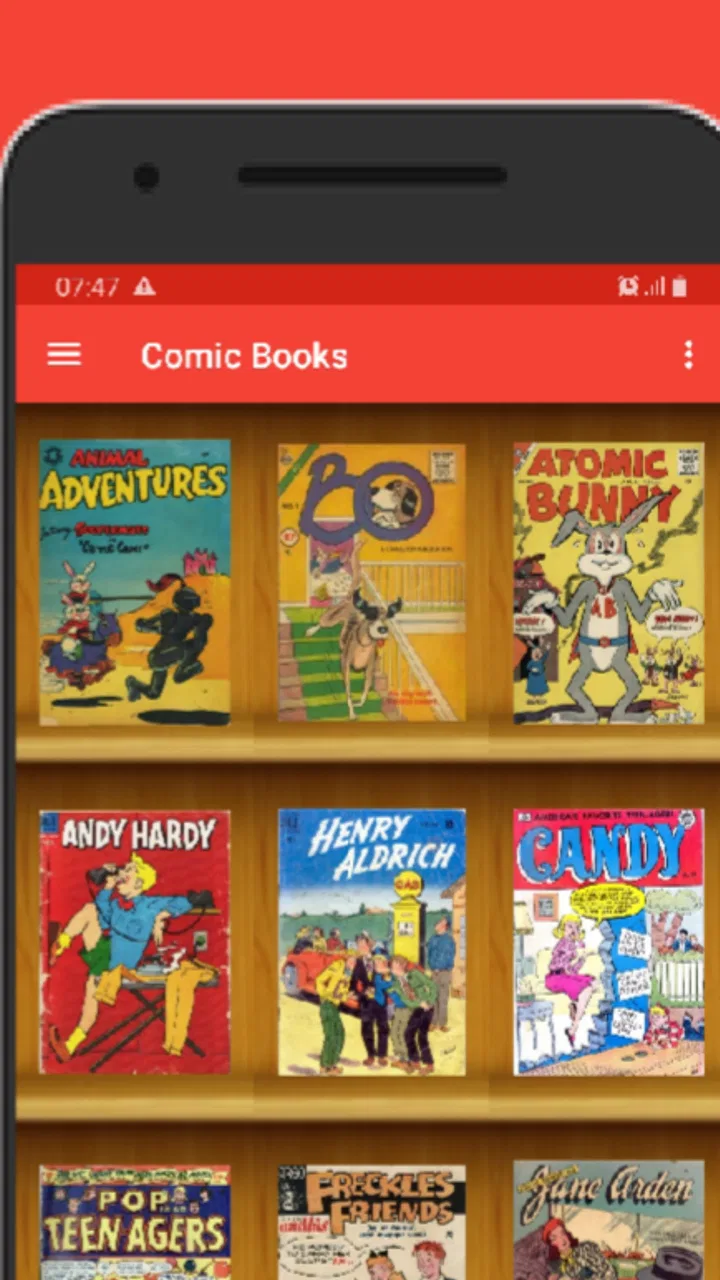
The defining capability is the bookshelf presentation. Instead of treating every CBZ or CBR file as an isolated document, the app gives the collection a more familiar visual shape. For anyone with several series, one-shots, or volumes stored on a phone, that makes choosing the next read less mechanical. I can think in terms of covers and shelves rather than trying to remember filenames or search through a generic file list.
You May Also Like

 Blood Strike: 2.5 Anniversary
Blood Strike’s Loadouts Turn Every Drop Into a Tactical Gamble
A close look at Blood Strike’s custom loadouts: how fast access to signature weapons reshapes its battle royale rhythm, rewards preparation, and narrows the gap between fights.

 Pandora - Music & Podcasts
Pandora’s Music Is Easy to Start, but Harder to Recover
Pandora’s strength is its low-effort path from a seed to a station. Its weak spot is how much confidence it asks you to place in connection, setup, and quiet recovery.

 8 Ball Pool
 Is Built on Rivalries, Rematches, and Routine
A close look at the rivalries, rematches, shared routines, and unanswered safety questions that turn a quick pool match into a persistent mobile community.

 Samsung Music
’s Quiet Strength Is Playing What You Already Own
Its reach comes less from spectacle than from dependable access to a personal library. That simplicity is both the app’s strongest retention engine and its ceiling.

 AccuWeather: Weather Radar
AccuWeather Review: A Quick, Clear Forecast for Everyday Decisions
For everyday plans, the best forecast is the one you can understand quickly. AccuWeather makes rain timing, radar, and local conditions easy to act on, with a few trade-offs.

 Hill Climb Racing
Why Hill Climb Racing Still Turns Crashes Into One More Run
A tiny car, a bumpy hill and one more upgrade: Hill Climb Racing keeps resurfacing because its simple chaos makes every near-miss feel personal.
More From Our News Desk



The bookshelf view is most useful when your collection has started to outgrow a basic file manager. A file manager is fine for locating one downloaded comic, but it is not designed around the small decisions readers make: which volume comes next, which issue I paused, or which title I want to browse while waiting somewhere. A visual library reduces that friction, especially when the files have meaningful cover images and sensible names.
There is also a useful separation between storage and reading. I do not have to treat my phone folders as the reading interface. The files remain the source material, while the app provides a more comfortable front end for opening them. That is a modest feature, but it is the kind of improvement I notice every time I return to a collection after a few days away.
Offline reading is the other important part of the experience. Once the comics are available on the device, I can read in places where a connection is unreliable or unavailable. This suits long journeys, commutes through areas with weak reception, and quiet breaks when I do not want to spend mobile data loading pages. It also makes the app feel more predictable than an online comic service, where the reading experience can depend on account access, network quality, or a changing catalog.
How I would set up a personal reading shelf
I would begin by keeping the collection tidy before opening it in the reader. Clear filenames make a difference, particularly when a series has multiple volumes or special issues. A structure based on series and reading order is more useful than simply placing every file in one large folder. The bookshelf can make a collection easier to browse, but it cannot correct a confusing archive on its own.
For a short collection, I would add a few issues first and check how the covers and titles appear. This is a better approach than copying an entire archive immediately. It lets me catch naming problems early and decide whether the visual arrangement matches the way I actually choose comics. If I mostly read one series at a time, grouping that series together is more valuable than creating a shelf full of unrelated files.
One practical habit is to prepare a small offline selection before leaving home. I would choose the next few comics, check that they open correctly, and then rely on the device during the trip. That workflow avoids the common mistake of assuming a file is ready simply because it is stored somewhere on the phone. It also keeps the reading choice manageable instead of turning a break into a long session of browsing.
The app’s free price makes this kind of trial easy. There is no purchase required to see whether the bookshelf approach suits your collection. In-app purchases are listed at $0.89 per item, so I would pay attention to any optional purchase prompt and decide whether it adds enough value to my own use. The low entry cost is helpful, but “free” does not automatically mean every reader will prefer this approach over an established paid reader or a subscription service.
What offline reading changes in everyday use
My favorite scenario is a commute where I know the signal will come and go. Before leaving, I would open the app, select a couple of issues, and put the phone away. When I get a seat, I can return to the shelf and start reading immediately instead of waiting for a page to load. If I stop halfway through, the app remains useful as a simple place to return to the same collection later.
Offline access is also valuable for readers who travel internationally or want to control data usage. A comic can contain many high-resolution pages, and repeatedly opening files from an online source is not always convenient. With a local library, the network is no longer part of the basic reading loop. That does not make the files smaller or the screen larger, but it removes one source of interruption.
There is a trade-off, though. Offline reading depends on preparation and local storage. If I forget to place a comic on the device, the bookshelf cannot magically provide it. Readers who want instant access to a large online catalog may find a cloud-based comic platform more convenient. This app is better suited to ownership and organization of files than to discovering a stream of new titles.
The reading workflow is simple, but the files still matter
CBZ and CBR are container formats commonly used for digital comic pages, and the app is built around reading that kind of material. The important practical point is that the quality of the experience begins with the files themselves. A well-prepared comic with a useful cover and pages in the right order is much easier to enjoy than a poorly assembled archive, regardless of the reader.
I would therefore treat the app as the last step in a small workflow: acquire comics from legitimate sources, store them in an orderly way, then use the reader to browse and open them. That approach avoids blaming the app for problems caused by a damaged archive, missing pages, or inconsistent naming. It also makes the bookshelf more meaningful because each item represents a deliberate part of the collection.
For a large library, I would keep series names consistent and avoid mixing alternate filenames for the same title. This is one of the less obvious lessons of a bookshelf interface: visual browsing is only as useful as the labels supporting it. A shelf filled with vague names may look more attractive than a folder list, but it can still be difficult to navigate. Taking a few minutes to organize the source files pays off every time I open the app.
Another useful habit is to separate reading copies from archival copies. I would keep a carefully backed-up master collection elsewhere and place only the comics I expect to read soon on the phone. That keeps the mobile shelf focused and reduces the chance of filling the device with material I am not likely to open. The app works especially well as a portable reading shelf when it is treated as a current queue rather than a complete archive.
Where it fits beside other comic-reading options
Compared with a standard file manager, Comic Books - CBZ, CBR Reader is more natural for browsing a comic collection. A file manager may offer broader access to documents, but it does not make comics feel like a dedicated library. The bookshelf view gives this app a clear advantage for readers who care about visual selection and want their files to feel like a collection rather than loose attachments.
Compared with subscription-based comic services, the difference is more fundamental. Those services usually appeal to readers who want discovery, recommendations, synchronized access, or a ready-made catalog. This app appeals to readers who already have files and want control over when and where they read them. I would choose the subscription route for effortless discovery, but I would choose this reader when my priority is a personal offline library.
Compared with a more advanced paid comic reader, the question is whether I need a long list of specialized controls. Some readers want extensive customization, detailed library management, or tools aimed at demanding collections. Comic Books - CBZ, CBR Reader is more appealing when I want the bookshelf and offline basics without spending time configuring a complex system. If advanced organization is the central requirement, another reader may be a better fit.
Small frictions I would consider before installing
The app’s focused design can also feel limited. A bookshelf is excellent for choosing from a personal collection, but it is not a replacement for a comic marketplace, a discovery engine, or a complete archival system. Someone starting with no digital files may install it and wonder what to read next. The answer is that the app is primarily a reader for comics you already have access to, not a built-in source of stories.
There is also the question of reading comfort on a phone. Comic pages can be designed for larger screens, and a bookshelf cannot change the physical size of the display. I found the app most convincing for short sessions, travel, and quick continuation of a series. If I wanted to study detailed artwork for a long period, a tablet or a dedicated larger-screen setup would be more comfortable, regardless of which reader I used.
Storage management deserves attention as well. Offline convenience is strongest when I plan ahead, but keeping many large comics locally can make the phone harder to manage. I would periodically remove completed issues or move older files back to long-term storage. That is not a reason to avoid the app; it is simply part of choosing local reading over a fully cloud-based library.
Because the content rating is Teen, parents and younger readers should treat that label as a useful boundary when deciding whether the app belongs on a shared device. The app is a reader, so the material available through it depends on the comics placed in the library. I would still curate the files themselves rather than assuming the reader determines whether every comic is suitable for a particular person.
Who gets the most from this reader
I would recommend it first to readers who have collected CBZ or CBR files and want a visual way to browse them. It is also a good match for someone who reads during travel, has inconsistent connectivity, or prefers not to depend on a subscription catalog. The free entry point makes it sensible to test with a small collection before deciding whether it deserves a permanent place on the phone.
It is particularly useful for a reader who thinks in reading queues. I can imagine keeping a few current series on the device, finishing one issue, and then choosing the next from the shelf without searching through folders. That is a small routine, but it turns spare moments into reliable reading time. The app’s strongest value is not a dramatic feature; it is the reduction of little obstacles between opening the phone and reaching the next page.
I would be less likely to recommend it to someone who wants comics delivered through a built-in store, expects automatic recommendations, or needs a synchronized library across several devices. I would also point advanced collectors toward a more specialized option if they require deep metadata management or a highly customized reading environment. The right choice depends less on the format name and more on whether the reader wants file ownership and offline simplicity.
Planner Apps has positioned this Android app around a clear use case, and the response suggests that use case resonates: it has an average rating of 4.0 from around 500 ratings, with over 50K installs. Those figures do not make it universally ideal, but they indicate that the basic bookshelf-and-offline concept has found an audience. I would treat that as encouragement to try it, not as a substitute for checking how it handles my own collection.
My recommendation after using it
Comic Books - CBZ, CBR Reader is easiest to recommend when your comics are already on your Android device and you want a calmer, more visual way to reach them. The bookshelf view gives a personal archive a sense of place, while offline reading makes the app practical beyond the home Wi-Fi network. I especially like the combination for commutes and travel, where preparation beforehand leads to a smooth reading session later.
My advice would be to start with a handful of well-named files, organize them by series, and test the offline workflow before moving over a large archive. That approach reveals quickly whether the shelf matches your habits and prevents a messy collection from creating unnecessary frustration. It also helps you decide whether the optional in-app purchases at $0.89 per item are worthwhile for your needs.
In the end, this is not trying to be every kind of comic platform. Its strength is narrower and more useful: it gives locally stored comics a dedicated bookshelf and keeps them available for offline reading. If that is exactly the gap in your current setup, I think it is worth trying. If you want discovery, cloud access, or advanced collection management above all else, I would look elsewhere. For personal CBZ and CBR reading on a compatible Android device, however, this is a focused and approachable choice.
FAQs for Comic Books - CBZ, CBR Reader
01What file formats does Comic Books - CBZ, CBR Reader support?
Comic Books - CBZ, CBR Reader is designed to support a wide range of comic book file formats, including CBZ, CBR, PDF, and more. This versatility allows users to access a vast library of comics without worrying about file compatibility issues, making it a convenient choice for comic enthusiasts.
02Is the app available for both Android and iOS devices?
Yes, Comic Books - CBZ, CBR Reader is available for both Android and iOS platforms. This cross-platform availability ensures that users can enjoy their favorite comics on a variety of devices, providing flexibility and convenience for readers who switch between smartphones and tablets.
03Does Comic Books - CBZ, CBR Reader offer any customization options?
Absolutely. The app provides various customization features, such as adjustable viewing modes, zoom options, and brightness controls. These features allow users to tailor their reading experience to their personal preferences, ensuring comfortable and enjoyable comic book reading sessions.
04Are there any in-app purchases or ads in Comic Books - CBZ, CBR Reader?
Comic Books - CBZ, CBR Reader offers a free version that may contain ads. However, users can opt for a premium version through in-app purchases, which removes ads and may offer additional features. This allows users to choose between a free experience with ads or an enhanced, ad-free reading experience.
05Can I organize my comic book collection within the app?
Yes, the app includes a library management feature that enables users to organize their comic book collection efficiently. Users can create folders, add tags, and sort comics by various criteria, making it easy to find and access specific titles within their digital library.
Pros
- Supports multiple file formats.
- Smooth and intuitive navigation.
- Offline reading capability.
- Customizable reading settings.
- Fast loading times for large files.
Cons
- Ads can be intrusive.
- Limited free features.
- Occasional crashes reported.
- No cloud sync options.
- Interface can feel dated.

Comic Books - CBZ, CBR Reader
Gallery